Top Five Tools for Social Media Content Creation

Serena

Updated for 2026!
The world of social media is incredibly chaotic, with Australia due to introduce a law to prevent under-16s from accessing certain social media platforms, and Instagram posts becoming searchable web content on Google and Bing.
Despite the chaos, social media remains a vital tool for businesses wanting to engage with potential clients, build their online identity, and drive traffic to their websites.
How do we navigate the chaotic whirlwind of social media content creation?
By equipping yourself with the right set of tools and software.
So, if the FI social team were stranded on a desert island and needed to create content (assuming it also had Wi-Fi), here are the five types of social media tools we wouldn’t be able to live without.
Working in such a fast-paced, reactive industry, it’s super important to use clear and accessible organisational tools. But with so many out there, picking the right one for you can seem pretty impossible. We’ve put three of the big names (and our personal faves) head to head…
First up: Notion – and yes, it’s way more than just a note-taking app! It’s the ultimate digital space for collaborative planning, project tracking, and asset management.
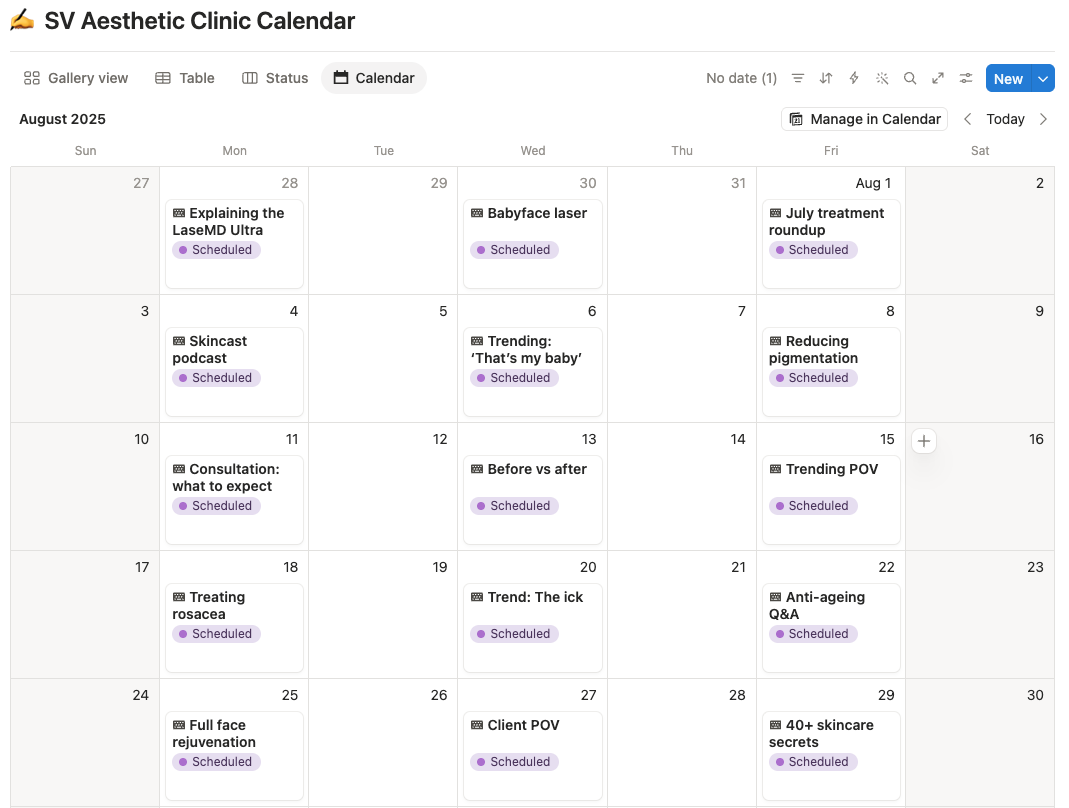
The First Internet social team swears by it to create flexible social calendars.
Take our client SV Aesthetic Clinic, for example. Its social strategy relies on a mixture of always-relevant information posts and reactive trending content that simply cannot wait. Notion helps us effortlessly move planned content around to jump on trends while they’re still a hot topic.
Plus, our clients can easily comment on our Notion calendars, sharing feedback directly and preventing super-lengthy email chains.
If Notion is the fun, creative team member, then Asana is the sensible one who turns up to every meeting with a time-stamped agenda.
Built primarily around project and task management, it’s a great option for teams managing multiple complex projects and deadlines. It lets you assign tasks to specific team members, set due dates, create clear timelines, and track progress without constantly pestering your team for updates.
It can feel a little more rigid than Notion, with slightly less room for customisation. But for larger projects with lots of moving parts, it offers some welcome structure.
Then, there’s Trello, the beautifully straightforward option.
Trello uses a visual Kanban board-and-card system to organise your project tasks in clear columns like To Do, In Progress and Done – very simple, very effective.
Its built-in Butler Automation no-code workflow tool also helps you automate repetitive tasks such as moving cards, setting due dates and adding members.
For smaller projects or straightforward workflows, Trello is a go-to.
| Tool | Best for | Key features | Choose this tool if… |
|---|---|---|---|
| Notion | Flexible, all-in-one organisation, content planning, collaboration | Customisable and accessible interface, collaboration with team members, free and paid templates, easily embed media and files | You want one flexible space for content calendars, projects, client information and team collaboration |
| Asana | Managing structured time-bound projects with clear start and end dates | Flexible project views (lists, boards, Gantt-style timelines), automated workflows, easily track team capacity | You’re heavily focused on data and reporting, and need a highly customisable dashboard |
| Trello | Simple, visual task management | Kanban board-and-card layout, built-in Butler automation to easily create rules and scheduled triggers for repetitive actions | You want a straightforward way to see what’s To Do, In Progress and Done without getting lost in a sea of features |
Ultimately, there’s no universal winner. It depends on what you need the tool to do and whether your team actually enjoys using it! For us, it’s got to be Notion for its sheer flexibility.
We know all too well that the world of social media is 24/7, not 9-5. With engagement likely to spike during the early-morning commute or the evening unwind, a social content scheduling tool should be non-negotiable for social media teams. But which to choose?
If your social audience loves a yap, this one’s for you.
HubSpot is best suited to very busy social teams managing big brands, where community engagement and comment moderation is a whole job in itself.
HubSpot’s social listening and monitoring tools help you keep a constant eye on your audiences, allowing you to respond directly from its own inbox.
According to Buffer, replying to your audience’s comments as a brand boosts engagement by 30%+ on LinkedIn and 21% on Instagram – so it’s pretty important that your scheduling tools have great social listening features.
If you’re big into data-driven strategies (why wouldn’t you be?!), Brandwatch has some of the most robust and detailed social reporting tools of any scheduling platform.
It offers super flexible reporting, allowing you to fine-tune which key metrics it pulls from your socials. You can easily build unlimited custom dashboards, and select from thousands of charts and visualisation features. If you have a premium subscription, you can also monitor team performance metrics like response times and support efforts.
Sprout is the ultimate all-rounder. Its clear content calendar feature, cross-network custom reporting, and social listening tools make it an ideal solution for mid- to-large agencies working with several clients at once.
When your client has posts going out across several social platforms almost every day, like our client Black Brick, Sprout’s clear, user-friendly calendar feature can seriously cut down on time spent scheduling in-app.
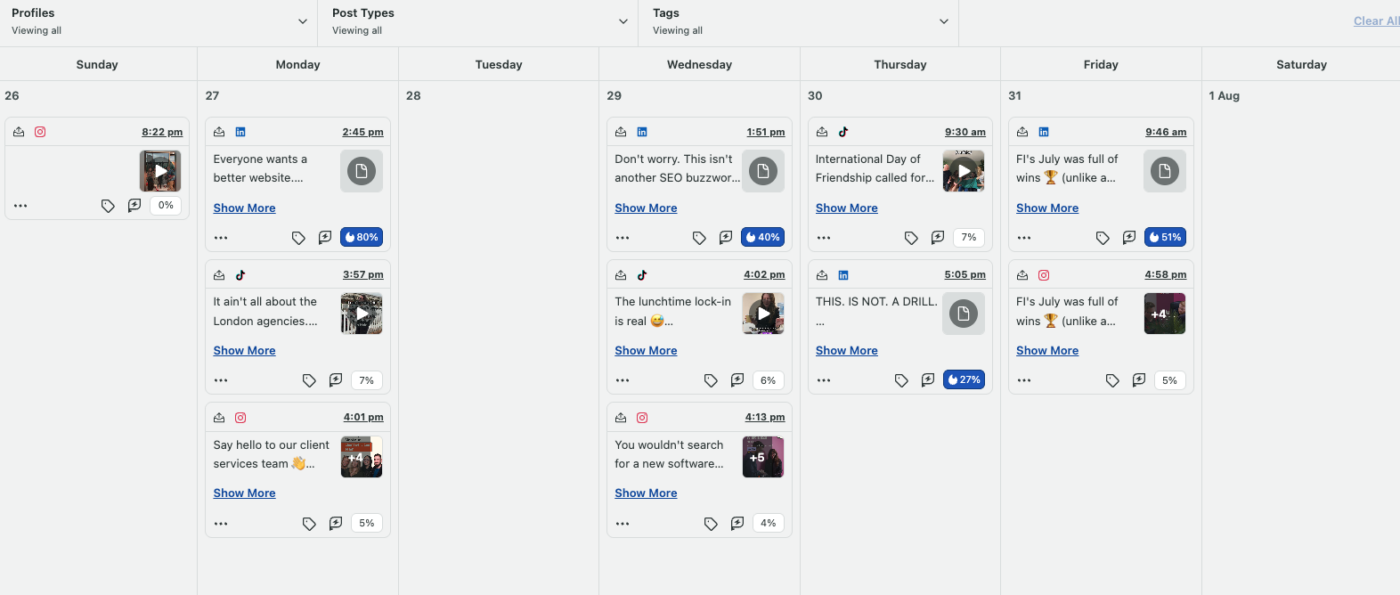
And, while its data visualisation isn’t quite as varied as the likes of Brandwatch, Sprout is great at pulling those key metrics that should be included in every single report (and the ones that we give our clients every single month).
Our take? If you’re looking for a solid all-rounder, with clear scheduling, strong reporting and keen social listening tools, we’d recommend Sprout Social.
| Tool | Best for | Key features | Choose this tool if… |
|---|---|---|---|
| HubSpot | Community engagement and social listening | Social listening and monitoring, social inbox to manage comments, CRM integration | You’re managing big brands with a heavy stream of comments |
| Brandwatch | Easily customisable reporting and data-driven social strategies | Advanced social reporting, extensive data visualisation, custom dashboards | You’re heavily focused on data and reporting, and need a highly customisable dashboard |
| Sprout Social | Managing multiple clients across multiple social platforms | Clear, visual content calendar, cross-network analytics, competitor insights | You’re part of an agency or company managing lots of mid-to-large sized clients at once |
In today’s attention economy, scroll-stopping, eye-catching social visuals are a must-have, whether you are B2B or B2C. They’re also a fantastic way for you to build your brand identity, communicate your messages, and grow a genuinely engaged audience. Here are the three design tools we can’t live without.
Now, we know some designers might beg to differ, but we are Canva-obsessed here at First Internet. It’s clear and straightforward – just like us!
Canva’s intuitive interface and versatile range of tools make it a super efficient way to produce unique designs for our clients in a fraction of the time it takes in Photoshop (and it even has a free version).
If you pay for Canva Pro, it also boasts a huge library of royalty-free photos, videos, and audio tracks – a great option for those times when sourcing original photos just isn’t possible.
Plus, Canva Pro’s ‘brand kit’ feature enables us to access each client’s brand colours, fonts and logos with just one click – great for ensuring consistent branding!
Photoshop is another favourite of ours. It’s ideal for editing and enhancing images to a professional standard, especially when they’ve been taken by clients themselves.
We know that hiring a professional photographer for every project or event is often simply not feasible, especially if your business operates across the UK, or even internationally. Sometimes, our clients need to take their own photos, but that doesn’t mean the standard of the content we upload should be any less.
That’s where Photoshop comes in. Its sharpening tools are truly our best friends when it comes to enhancing the quality of our clients’ images.
Another professional-grade design tool that gives you a HUGE level of customisation and collaboration.
Figma allows for a level of collective working that simply isn’t doable on Photoshop. Multiple users can design, comment and review projects simultaneously in the cloud (though that does mean you always need internet access to use it, unlike Photoshop).
You can also easily send designs to clients for review, customising access permissions to control exactly who can comment on each design.
Our take? If you can afford all of these tools, get them! When used together, they each serve a unique function. But if you’re on a budget and can only choose one, Canva Pro is definitely the most accessible.
| Tool | Best for | Key features | Choose this tool if… |
|---|---|---|---|
| Canva Pro | Quick, accessible, social-first graphic design | Intuitive, budget-friendly, access to a wide range of tools and royalty-free elements | You want to create polished designs quickly without needing advanced design skills |
| Adobe Photoshop | Advanced image editing and photo manipulation | Professional-grade AI-powered image editing, seamless integration with other Adobe software | You need precise, creative control over images or photos |
| Figma | Collaborative digital design | Interface design, prototyping, real-time collaboration | You’re working as part of a team where collaboration is crucial |
TikTok is estimated to have over 1.5 billion monthly active users across the world, according to Demand Sage, so high-quality short-form video content has never been more important for brands looking to grow on social media.
We’re constantly seeing personalised, human-focused content being favoured by viewers on social media, especially on platforms like Instagram and TikTok.
That’s why short-form videos are fundamental for many of our clients, whether they’re in the beauty industry, law, or even the fuel business. That being said, your editing software needs to be as versatile as your video ideas. Here are our favourites.
While on the pricier side, Premiere Pro is the industry standard for a reason.
For your investment, you gain access to high-quality outputs, in-depth colour grading, audio enhancement, motion graphics, and plenty of tools to get super specific with your edits.
We use it for more technical content (like syncing audio and video tracks easily, or isolating background noise), or any edits that need an extra level of creative *flair*.
Compared to the likes of CapCut, Premiere Pro definitely has a steeper learning curve. But if you want greater control over the final product, it’s difficult to beat.
Its biggest strengths? Speed and simplicity.
CapCut offers a free version, where you can easily make basic edits, add basic transitions and effects, and gain access to a variety of free templates, while a CapCut Pro subscription gives you more advanced features, AI tools and a greater number of effects – perfect if you need to make a ton of short-form content quickly.
CapCut also comes fully equipped with a built-in library of royalty-free music and sound effects, which help your content feel native to platforms like TikTok and Instagram.
Compared with Premiere Pro, CapCut does sacrifice some of the granular control and advanced editing capabilities. But for everyday short-form social content, that trade-off can be pretty worthwhile.
If you LOVE colour grading, this one’s for you.
In fact, it’s widely regarded as the industry standard as far as colour grading goes, with powerful colour-management tools and advanced scopes that give you much more control than the likes of CapCut.
And there’s a pretty good free version, although some features, like advanced noise reduction tools, are reserved for its paid version, DaVinci Resolve Studio.
Compared with CapCut, DaVinci Resolve can be a little less intuitive for complete beginners. It’s much more focused on detailed, professional editing, rather than quick social content, so it might be a better option if you’re looking to make quality branded video content where tones, hues and lighting all need precise control.
| Tool | Best for | Key features | Choose this tool if… |
|---|---|---|---|
| Adobe Premiere Pro | Professional long-form and short-form video editing | Advanced timeline editing, colour correction, audio enhancement tools, motion graphics and Adobe Creative Cloud integration | You want a professional, industry-standard tool with extensive creative control |
| CapCut | Quick social-first short-form content | Intuitive drag-and-drop editing, social-first templates, effects and transitions, auto-captions, access to royalty-free music and sound effects | You need to quickly make reactive, trend-based Reels, TikToks or YouTube Shorts |
| DaVinci Resolve | High-quality editing and colour grading | Advanced colour grading, professional editing, powerful colour scopes and a great free version for those just starting out | Consistent, high-quality colour grading is needed as part of your brand identity on social media |
There is often no better place to get inspiration, research competitors, and understand what is currently popular than social media itself.
Plus, editing in-app can help your content feel more native to each specific social platform, which can often help it perform better within platform algorithms.
Here’s our advice for editing in-app:
If Instagram is a big part of your social strategy, it’s worth downloading Instagram’s official editing app: Edits. It’s designed specifically for creating Instagram-worthy content.
Our tip: Keep an eye on music licensing, particularly when creating content for brands. Edits will label royalty-free music, but always double-check before posting!
For TikTok, TikTok Studio is your best friend. It brings together tools to record, edit, schedule and manage your videos, while also giving you access to analytics so you can see what’s actually performing.
It’s a great way to keep your content feeling like it belongs on the platform rather than looking like it’s been awkwardly repurposed from somewhere else.
Our take? They’re free, so why not have a play around with both?
We hope this blog has shown you that, when it comes to ensuring your business has a relevant, dynamic social media presence, the tools that your social media team use are just as important as their creative ideas.
Equipped with these tools, you’re more than ready to navigate the chaotic world of social media content creation and make sure your content stays fresh, whether that be from your office or from that desert island.
Want to find out how we could use these tools to help imrpove your social media presence?